MEXC Sign Up, Register and Join: Up to $10,000 in rewards + 20% Lower Trading Fees
20% lower spot and futures trading fees through our link.
Most people just share a referral link. We give you 20% of our commission back — automatically, through the fee discount.
MEXC offers up to $10,000 for completing new-user tasks and charges 0% spot maker fees, and registering takes 4 steps. Below: the invitation page our link opens, each screen in order, the Primary and Advanced KYC limits, card limits and how to claim the Rewards Hub rewards, all read from MEXC's own pages on 29 September 2026.
How to sign up and register on MEXC
- Open our link: the invitation page asks for your email or phone number
- Set a password and complete the slider puzzle
- Enter the 6-digit code MEXC emails you
Referral code: mexc-coinport. It was already filled in when we opened our link on 30 September 2026; if the field is empty, tick “Enter Referral Code” (web) or tap the arrow (app) and type it.
Claim 20% off fees on MEXC → 20% lower trading fees through this link
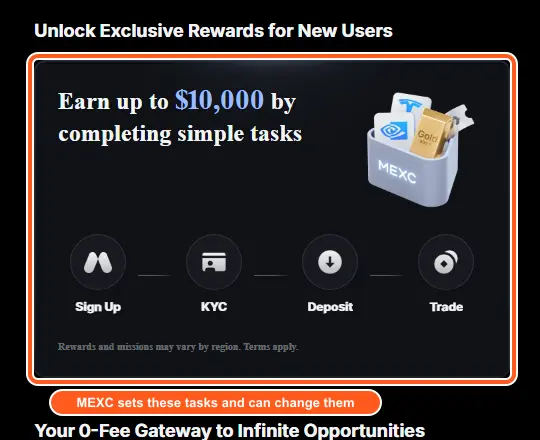
MEXC sign-up offer: Up to $10,000 by completing sign-up, KYC, deposit, and trading tasks. Read from MEXC's own invitation page and Rewards Hub on 29 September 2026; the rewards section below shows how to claim each part.
MEXC accepts an email address, a mobile number, or a Google, Apple, Telegram or MetaMask login. On its standard web form the password must be at least 10 characters mixing upper case, lower case, numbers and symbols, a slider puzzle follows, and a 6-digit code arrives by email. After sign-up MEXC has two KYC levels with published limits: Primary raises crypto withdrawals to 80 BTC a day and Advanced to 200 BTC a day. This guide covers the screens, what the page our link opens looks like, and the rules and limits MEXC states. Everything was read from MEXC's own pages on 29 September 2026.
What you need to register on MEXC
- An email address or a mobile number. MEXC also accepts a Google, Apple, Telegram or MetaMask login on the web; the app adds wallet connection and other third-party logins.
- A password of at least 10 characters mixing upper case, lower case, numbers and symbols, if you sign up with an email or phone.
- Access to your email, because MEXC sends a 6-digit code after a slider puzzle.
- A country MEXC accepts registrations from. Its User Agreement lists prohibited jurisdictions, in the section below.
- For KYC, which MEXC says can affect deposits, withdrawals and trading depending on your region: an ID card, passport, driver's license or residence permit, as an original, unexpired document in JPG, JPEG or PNG under 5 MB.
(source: Sign-up (web), Sign-up (app), KYC FAQ, KYC questions, User Agreement, read 29 September 2026)
MEXC sign-up at a glance
| Topic | What MEXC says | Source |
|---|---|---|
| Sign-up options | Email, mobile number, or a Google, Apple, MetaMask wallet or Telegram login on the web. The app adds wallet connection and other third-party logins | Sign-up (web), Sign-up (app) |
| Password | At least 10 characters, including uppercase and lowercase letters, numbers and symbols | Sign-up (web) |
| Security check | Drag a slider to complete a puzzle, then enter the 6-digit code sent to your email | Sign-up (web) |
| Minimum deposit | Some cryptocurrencies require a minimum deposit: look up yours for your coin and network before you send, since a deposit below the required minimum is not credited and cannot be refunded | Crypto deposit |
| Referral code box | On the web form tick “Enter Referral Code” to reveal the field. In the app tap the arrow (▾) to reveal it | Sign-up (web), Sign-up (app) |
| Primary KYC | Crypto withdrawals up to 80 BTC a day; fiat through P2P; spot and futures trading; platform events | KYC FAQ |
| Advanced KYC | Crypto withdrawals up to 200 BTC a day; fiat trading up to 20,000 USD a day; spot and futures trading; platform events | KYC FAQ |
| KYC and access | MEXC says whether deposits, withdrawals and trading stay open before KYC depends on your region, and that the on-screen prompts show which | KYC FAQ |
| KYC review time | Normally within 15 minutes; some applications take 8 to 24 hours. The card guide says Advanced KYC takes 24 to 48 hours | KYC FAQ, Card guide |
| KYC attempts | Up to 3 Primary and 3 Advanced applications per day | KYC FAQ |
| Rewards Hub headline | Up to $10,000 by completing sign-up, KYC, deposit, and trading tasks | Rewards Hub |
(source: the linked MEXC page in each row, read 29 September 2026; each page's own date is in the Sources list at the end)
MEXC sign-up, step by step
1. Open the invitation page
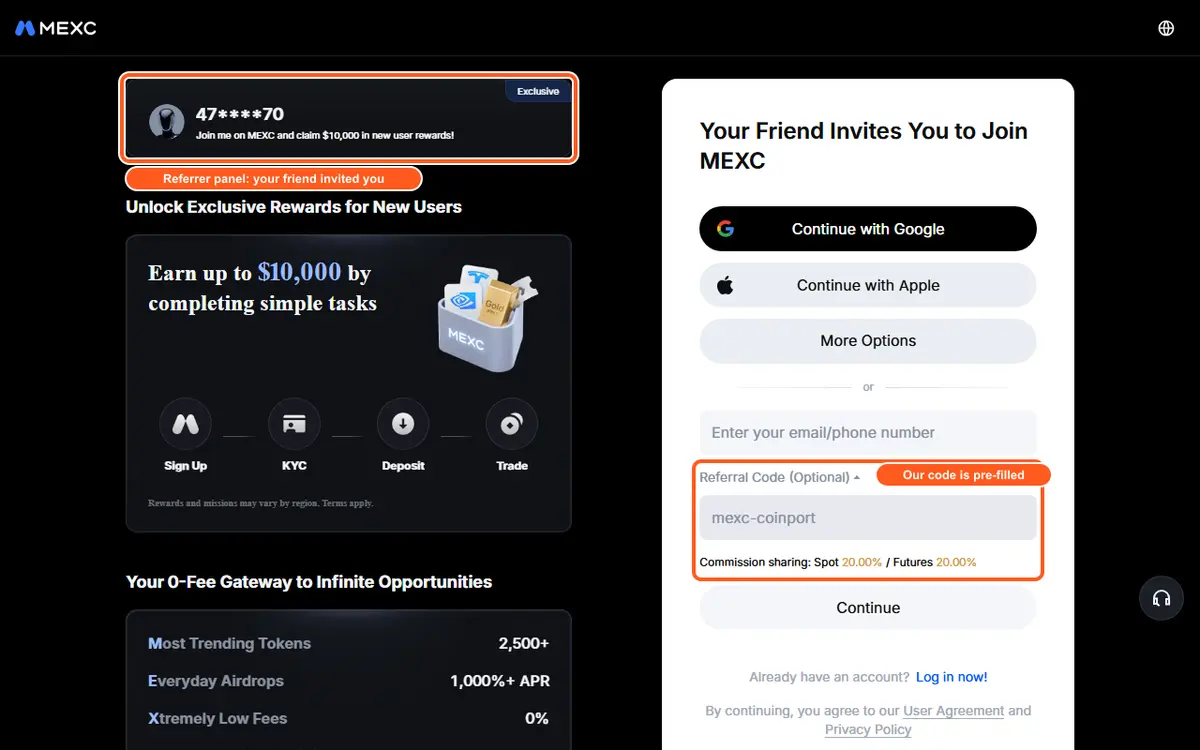
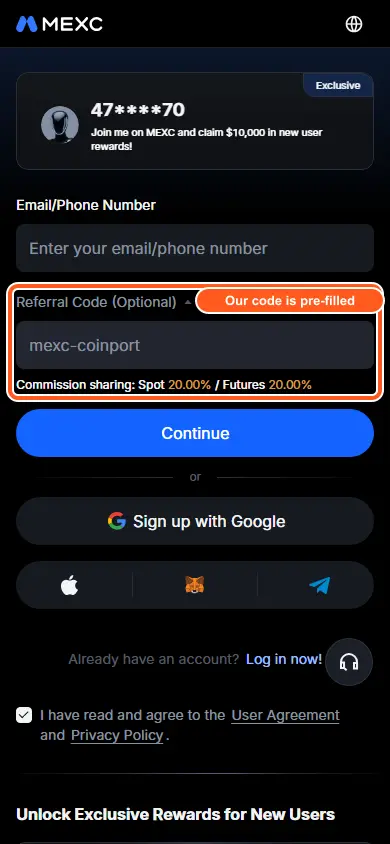
Our link opens a page headed “Your Friend Invites You to Join MEXC”. On 29 September 2026 it offered Continue with Google, Continue with Apple and More Options buttons, and one field, “Enter your email/phone number”, above a Continue button, with a line saying that continuing means you agree to the User Agreement and Privacy Policy. On our 29 September look this first screen had no separate referral-code box. Re-opened on 30 September 2026 it showed one: a “Referral Code (Optional)” field already filled with mexc-coinport, with a “Commission sharing” line for spot and futures under it, and a panel at the top of the page showing the masked account of the person who invited you. The layout can change between visits; the section below shows what to look for.
2. Email and password
MEXC's web guide describes the standard form: press Sign Up, enter your email address or mobile number and a password, then press Sign Up again. The first screen of the invitation page differs from that (one field and Continue), and MEXC's guides do not cover the screens after Continue, so the remaining steps are MEXC's description of the standard form.
3. The slider puzzle
Drag the slider to complete the puzzle verification. Once it passes you are taken to the next screen automatically.
4. The 6-digit code
Enter the 6-digit code MEXC emailed you and press Confirm. If you cannot find it in your inbox, spam or trash, press “Haven't received verification code?” to request it again.
(source: MEXC Help Center: account sign-up process (web), read 29 September 2026)
App, wallet and third-party routes
In the app MEXC treats a new user's first login as the sign-up. An email or phone sign-up follows the same password rule, slider and emailed code, and the referral field sits behind an arrow (▾). A wallet sign-up takes two steps, connecting the wallet and then signing a request in it (the guide demonstrates MetaMask). A Google, Apple or Telegram sign-up ends with a verification code and a Link Now button.
(source: MEXC Help Center: account sign-up process (app), read 29 September 2026)
Confirm your pre-filled referral code
On the page our link opens, the headline to look for is “Your Friend Invites You to Join MEXC”; on 30 September 2026 that screen also carried a Referral Code (Optional) field already filled with mexc-coinport, although on 29 September it had no box, so the layout can change. If the field is missing, or you land on MEXC's standard sign-up form instead, tick “Enter Referral Code” on the web or tap the arrow in the app and check the field: the code in our link is mexc-coinport, the value the pre-filled field should show.
Add the code when you sign up: the pre-filled field, or the link itself, applies it for you. MEXC's sign-up guides describe the code as part of sign-up and do not describe adding it afterwards, so use our link when you sign up.
(source: MEXC Help Center: account sign-up process (web); MEXC Help Center: account sign-up process (app), read 29 September 2026)
Claim 20% off fees on MEXC → 20% lower trading fees through this link
MEXC KYC: Primary and Advanced
MEXC offers two individual levels. Its KYC FAQ sets them out like this:
| Level | Crypto deposit | Crypto withdrawal | Fiat | Spot and futures trading |
|---|---|---|---|---|
| Primary KYC | Unlimited | 80 BTC per day | P2P | Yes |
| Advanced KYC | Unlimited | 200 BTC per day | 20,000 USD per day | Yes |
(source: MEXC Help Center: KYC FAQ, read 29 September 2026)
Documents and photos
MEXC accepts an ID card, passport, driver's license or residence permit. Upload JPG, JPEG or PNG files under 5 MB of the original, unexpired document: screenshots and photocopies are refused, and so is a document issued by a restricted country. If you sent wrong details with Primary KYC, MEXC says to go straight to Advanced KYC, whose information then becomes the final record. The details in the two submissions must agree.
(source: MEXC Help Center: common questions about KYC verification; MEXC Help Center: KYC FAQ, read 29 September 2026)
How long it takes, and how many tries you get
Under normal circumstances a review finishes within 15 minutes. MEXC says some applications take 8 to 24 hours, and its card guide puts Advanced KYC at 24 to 48 hours. You can apply for Primary KYC up to 3 times a day and for Advanced KYC up to 3 times a day; after a “verification limit exceeded” notice, try again after 24 hours. MEXC emails the result, with the reason if it was not approved.
(source: MEXC Help Center: KYC FAQ; MEXC Help Center: common questions about KYC verification; MEXC Help Center: buy crypto with a credit or debit card, read 29 September 2026)
Trading and KYC
MEXC's FAQ says that, to comply with regulations in your region, not completing KYC may affect access to services such as deposits, withdrawals and trading, and that the on-screen prompts show which. It describes two prompts. On a deposit: funds are restricted and cannot be credited until real-name verification is done, and MEXC offers an Application for Return page if you cannot verify. On a withdrawal: you have not completed real-name verification, and MEXC offers a Withdrawal Appeal Form; if it is approved the account keeps only withdrawal and position-closing permissions.
(source: MEXC Help Center: KYC FAQ, read 29 September 2026)
MEXC availability by country
MEXC's User Agreement (last updated 29 May 2025) says MEXC does not provide services or accept registrations in North Korea, Cuba, Sudan, Iran, Mainland China, Singapore, Malaysia, the United States, the United Kingdom, Hong Kong, Kazakhstan, the Russian-controlled regions of Ukraine (currently including Crimea, Donetsk, Luhansk, Zaporizhzhia, Kherson and Sevastopol) and Canada, or in any country or territory under comprehensive economic or trade sanctions administered by the European Union or the US Treasury's OFAC, or that the Financial Action Task Force lists as a high-risk jurisdiction subject to a call for action. It calls its list non-exclusive and subject to change at any time. A document issued by a restricted country is also refused for KYC.
The list is MEXC's and can change; the User Agreement page has the current version.
(source: MEXC User Agreement; MEXC Help Center: common questions about KYC verification, read 29 September 2026)
Paying by card, and what counts as a deposit
MEXC's card guide (page dated 22 June 2026) says card purchases need Advanced KYC first and accept Visa and MasterCard cards issued in your own name. It supports USD, EUR, GBP, AED and BRL, quotes a fee of about 2%, and states these limits:
| Currency | Per transaction | Per day |
|---|---|---|
| USD | 5,000 | 10,000 |
| EUR | 5,000 | 10,000 |
| GBP | 5,000 | 10,000 |
| AED | 18,000 | 36,000 |
| BRL | 28,000 | 56,000 |
(source: MEXC Help Center: buy crypto with a credit or debit card, read 29 September 2026)
For Rewards Hub tasks, MEXC counts on-chain deposits and P2P or fiat buys; internal transfers are not counted.
(source: MEXC Rewards Hub, read 29 September 2026)
MEXC minimum deposit
Its crypto-deposit article says some cryptocurrencies require a minimum deposit amount, and that if the amount you send is below the required minimum it will not be credited and cannot be refunded. Look up the minimum for your coin and network before you send, and a small test deposit first is a good habit.
(source: MEXC Help Center: what is a crypto deposit?, read 30 September 2026)
The other ways to fund the account publish limits: the card guide (page dated 22 June 2026, in the section above) states maximums per transaction and per day. A separate figure to keep apart from all of this is the deposit that a Rewards Hub task asks for: that is a condition for a reward, not MEXC's minimum to fund an account.
(source: MEXC Help Center: buy crypto with a credit or debit card; MEXC Rewards Hub, read 29 September 2026)
How to use MEXC after sign-up: your first trade in 4 steps
MEXC's limit-order guide (page dated 7 September 2026) uses the MX/USDT pair as its example. The same steps work for any spot pair:
- Get funds into the account. Deposit crypto on the network the sending wallet uses (see the minimum-deposit section above), or buy with a card once Advanced KYC is done.
- Open the pair. On the website choose Spot and select the trading pair; in the app choose Trade and select the pair.
- Choose Limit, enter Price and Amount. MEXC's guide also has you check and set TP/SL if you want a take-profit or stop-loss order attached.
- Press Buy. The order then sits under Open Orders until the market reaches your price or a better one.
What you pay: MEXC's guide says limit orders are usually executed as maker orders, with a fee rate generally lower than market orders, which are taker orders. On MEXC's regular tier that is 0% maker and 0.05% taker for spot (the fee table below). The guide adds that a buy limit priced above the current market price, or a sell limit priced below it, may be treated as a taker order and pay the higher rate.
(source: MEXC Help Center: how to use limit orders in spot trading, read 30 September 2026)
How to claim the MEXC Rewards Hub rewards
MEXC's Rewards Hub lists new-user rewards. The main items it showed on 29 September 2026:
| Item | What the page says |
|---|---|
| Sign-up voucher | 20 USDT for signing up a new account |
| App voucher | 5 USDT for a first login on the App or Lite App |
| Daily futures bonuses | 1, 2, 3 and 10 USDT for futures trading of at least 3,000, 8,000, 25,000 and 120,000 USDT (the page lists more) |
| Timed double reward | Futures bonus of up to 6,500 USDT for cumulative net deposits and trades; its entry line asks for a deposit of at least 500 USDT and trading of at least 5,000 USDT |
The terms on the same page add: some tasks need Primary or Advanced KYC before rewards can be claimed; each user can join only one new-user event at a time; progress can take up to 30 minutes to update; rewards are claimed manually and every reward goes through a risk review that typically takes up to 7 calendar days; unclaimed rewards expire. Futures bonuses can only be used for futures trading and cannot be withdrawn (profits from bonus-funded trades can be), and moving assets out of the Futures account before a bonus is fully used forfeits the whole bonus. Vouchers offset futures trading fees and lapse if unused. Users in countries where derivatives trading is prohibited may not be eligible for futures rewards.
(source: MEXC Rewards Hub, read 29 September 2026)
Your trading fees once the account is open
| Maker | Taker | |
|---|---|---|
| Spot | 0% | 0.05% |
| Futures | 0%–0.04% | 0%–0.10% |
(source: MEXC fee page, base (non-VIP) tier rates as recorded on 9 September 2026; futures rates re-read on 29 September 2026)
MEXC sets futures rates per contract, so the range above is its overall range: BTCUSDT is 0% maker / 0.02% taker, ETHUSDT is 0% / 0.01%, and some contracts are marked zero-fee. MEXC also says rates may vary with platform events or user region, so check the fee page in your own account for your exact rate.
MEXC's fee page, read again on 29 September 2026, lists the same regular spot rates as the table above and marks some pairs as zero-fee. Futures rates are set per contract: the page listed the BTCUSDT perpetual at 0.000% maker and 0.020% taker and the ETHUSDT perpetual at 0.000% maker and 0.010% taker, marked some contracts as zero-fee, and showed an overall range of 0.000% to 0.040% maker and 0.000% to 0.100% taker. The futures range in the table is that overall range, so check the rate for the contract you trade.
(source: MEXC fee page, read 29 September 2026)
Quick fixes if sign-up gets stuck
| If this happens | What MEXC says to do | Source |
|---|---|---|
| Where is the 6-digit email code? | Check the inbox, spam and trash, then press “Haven't received verification code?” on the web or “Didn't Receive Verification Code?” in the app to request it again. | Sign-up (web), Sign-up (app) |
| Where is the referral code field? | Tick “Enter Referral Code” on the web or tap the arrow (▾) in the app to reveal it, and check it reads the code in our link, mexc-coinport. MEXC's referral guide says opening the link in a browser applies the code automatically. | Sign-up (web), Sign-up (app), Invite guide |
| Checking whether MEXC accepts your country | MEXC's User Agreement names the prohibited jurisdictions and says the list is non-exclusive and can change at any time. Read the clause before you register; a document issued by a restricted country is also refused for KYC. | User Agreement, KYC questions |
| Choosing a password MEXC accepts | MEXC requires at least 10 characters, including uppercase and lowercase letters, numbers and symbols. | Sign-up (web) |
| “KYC verification limit exceeded” | MEXC allows 3 Primary and 3 Advanced applications a day. Try again after 24 hours. | KYC FAQ |
| “You have already completed KYC verification on another account” | Your identity details are already tied to another MEXC account. MEXC says each user may complete verification for up to two accounts. | KYC FAQ |
| A deposit shows “Funds are restricted and cannot be credited” | KYC is not complete. Finish verification, or use the Application for Return page to ask for the restricted funds back. | KYC FAQ |
| A withdrawal asks for real-name verification | Complete KYC, or submit a Withdrawal Appeal Form. If it is approved the account keeps only withdrawal and position-closing permissions. | KYC FAQ |
| Documents need another try | MEXC lists blurry or incomplete photos, unsupported document types, expired documents, screenshots or photocopies, and details that differ between Primary and Advanced KYC. | KYC questions |
| Photos need another upload | Use JPG, JPEG or PNG under 5 MB of your own original document. Wait and resubmit, clear the cache, try another browser or update the app. | KYC questions |
MEXC sign-up questions
How do I register on MEXC?
Registering on MEXC takes 4 steps: 1. Open the invitation page; 2. Email and password; 3. The slider puzzle; 4. The 6-digit code. Each step is explained in the step-by-step section of this guide, with the MEXC help page it comes from.
Do I get lower trading fees if I register on MEXC through your link?
20% lower trading fees when you sign up through this link: we pass 20% of our referral commission back to you. MEXC’s sign-up page for our link shows “Commission sharing: Spot 20.00% / Futures 20.00%” (seen 30 September 2026).
Can I sign up for MEXC with just an email address?
Yes. MEXC accepts an email address or a mobile number, and on the web also a Google, Apple, MetaMask wallet or Telegram login. In the app a new user's first login counts as the sign-up. Email sign-up needs a password, a slider puzzle and the 6-digit code sent to your inbox.
What password does MEXC require?
At least 10 characters, including uppercase letters, lowercase letters, numbers and symbols, according to MEXC's web and app sign-up guides.
Do I need KYC to trade on MEXC?
It depends on your region. MEXC says not completing KYC may affect access to deposits, withdrawals and trading, and that the on-screen prompts show which. Primary KYC allows crypto withdrawals up to 80 BTC a day, and Advanced KYC up to 200 BTC a day.
How long does MEXC KYC take?
Normally within 15 minutes, according to MEXC's KYC FAQ, though some applications take 8 to 24 hours. MEXC's card guide puts Advanced KYC at 24 to 48 hours. You can apply for Primary and for Advanced KYC up to 3 times a day each.
What is the difference between Primary and Advanced KYC on MEXC?
Both allow unlimited crypto deposits and spot and futures trading. Primary KYC allows crypto withdrawals up to 80 BTC a day and fiat through P2P; Advanced KYC allows up to 200 BTC a day and fiat trading up to 20,000 USD a day. Card purchases need Advanced KYC.
Where do I enter the MEXC referral code?
On MEXC's standard web form, tick Enter Referral Code and type it in; in the app tap the arrow to reveal the field. The code in our link is mexc-coinport, and the page our link opens is headed Your Friend Invites You to Join MEXC; on 30 September 2026 it showed the field already filled in.
When do I add the MEXC referral code?
Add the code when you sign up. MEXC's invite-friends guide (page dated 8 June 2026, read 30 September 2026) says a new user can enter the referral code during sign-up and that opening the referral link in a browser applies the code automatically. Its sign-up guides describe the code as part of sign-up and do not describe adding it afterwards, so use our link when you sign up.
What is the minimum deposit on MEXC?
Some cryptocurrencies require a minimum deposit, according to MEXC's crypto-deposit article, and a deposit below the required minimum is not credited and cannot be refunded. Look up the minimum for your coin and network before you send, and a small test deposit first is a good habit. The card guide states per-transaction and per-day maximums.
How do I place my first trade on MEXC?
Fund the account, open Spot on the website (or Trade in the app) and pick a pair, choose Limit, enter the price and amount, and press Buy. MEXC's limit-order guide says limit orders are usually maker orders, which on MEXC's regular tier cost 0% for spot against 0.05% for a taker order.
Is MEXC available in my country?
MEXC's User Agreement, last updated 29 May 2025, lists prohibited jurisdictions including North Korea, Cuba, Sudan, Iran, Mainland China, Singapore, Malaysia, the United States, the United Kingdom, Hong Kong, Kazakhstan and Canada, plus sanctioned and FATF high-risk places, and says the list can change at any time. Read the full clause before you register.
What do I get for signing up to MEXC through your link?
MEXC's Rewards Hub lists new-user tasks, including a 20 USDT sign-up voucher and a 5 USDT app voucher, plus futures bonuses tied to deposit and trading volume. Rewards are claimed manually, go through a risk review of up to 7 calendar days, and some tasks need KYC. MEXC sets and can change the offer.
Sources
The pages below were read on 29 September 2026. On our own link we looked only at the first screen of the invitation page, because typing an email address there would have created an account; the later screens are described from MEXC's guides. Bracketed dates are the pages' own, and MEXC's User Agreement is the oldest, from May 2025. The crypto-deposit and limit-order pages, which back the minimum-deposit and first-trade sections, were read on 30 September 2026.
- MEXC Help Center: account sign-up process (web) (page dated 10 December 2025)
- MEXC Help Center: account sign-up process (app) (page dated 14 May 2026)
- MEXC Help Center: KYC FAQ (page dated 2 June 2026)
- MEXC Help Center: common questions about KYC verification (page dated 2 April 2026)
- MEXC User Agreement (last updated 29 May 2025)
- MEXC Help Center: buy crypto with a credit or debit card (page dated 22 June 2026)
- MEXC Rewards Hub (live page)
- MEXC fee page (live page)
- MEXC Help Center: what is a crypto deposit? (page dated 10 December 2025)
- MEXC Help Center: invite friends to sign up on MEXC (page dated 8 June 2026, read 30 September 2026)
- MEXC Help Center: how to use limit orders in spot trading (page dated 7 September 2026)