OKX Sign Up: 20% Lower Trading Fees
20% lower spot and futures trading fees through our link. OKX’s own sign-up page also says “10% off on trading fees” (read 29 September 2026).
Most people just share a referral link. We give you 20% of our commission back — automatically, through the fee discount.
OKX's sign-up page says “10% off on trading fees”, and registering takes 6 steps, including both an email address and a phone number. Below: each step in order, the referral code your link carries, OKX's 24-hour KYC review and how to claim the new-user rewards, all read on 29 September 2026.
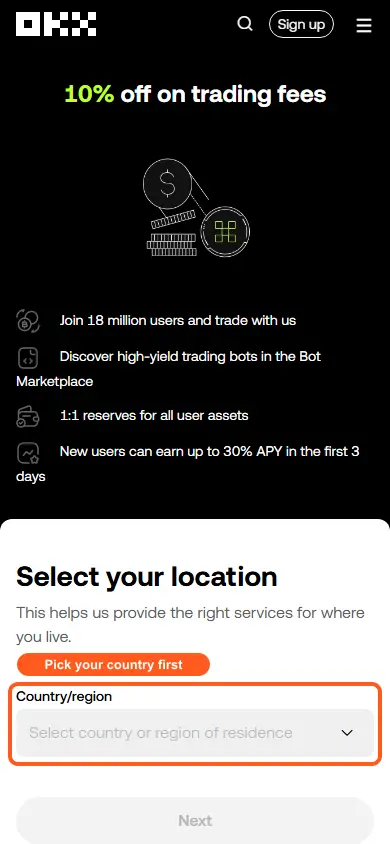
OKX sign-up offer: 10% off trading fees for new users. OKX's own sign-up page says “10% off on trading fees” (read 29 September 2026); that is OKX's offer, and the rate that applies to your account shows in your account after sign-up.
Claim 20% off fees on OKX → 20% lower trading fees through this link
OKX opens with “Select your location”, asks for the country or region where you currently and ordinarily live, and then wants both an email address and a phone number: its help center says both must be bound during registration. A password follows, and then identity verification, which OKX says an individual account needs at the advanced level and reviews within 24 hours. The referral code goes in at sign-up: OKX says it cannot be added or changed once the account exists. Everything below was read from OKX's own pages on 29 September 2026.
OKX sign-up at a glance
| Topic | What OKX says | Source |
|---|---|---|
| First screen | Select your location: the country or region where you currently and ordinarily reside, not your nationality or passport country | Register |
| Email and phone | Both must be bound during registration, each confirmed with a 6-digit code that is valid for 10 minutes | Register |
| Password | A combination of numbers, letters, symbols and upper and lower case | Register |
| Referral code | Entered in the email step as “Referral code (if any)”, at sign-up. OKX says it cannot be added or changed once the account exists | Register, Referral FAQ |
| Minimum age | 18, or the minimum legal age shown on the registration page, with no exceptions | Register |
| KYC requirement | Advanced identity verification is needed to use an individual account. OKX says you can trade, deposit and withdraw after completing it | Individual verification |
| KYC review time | OKX says it reviews the application within 24 hours | Individual verification |
| 24-hour withdrawal limit | 10,000,000 USD at the Regular tier on OKX's fee page | Fee page |
| Offer on our link | 10% off trading fees for new users | Sign-up page our link opens, 29 Sep 2026 |
| Card purchases | Visa and Mastercard, with fees quoted per currency. Credit cards are not supported in Singapore and the US, only debit cards | Card guide |
(source: the linked OKX page in each row, read 29 September 2026; each page's own date is in the Sources list at the end)
OKX sign-up, step by step
1. Select your location
Our link opens OKX's sign-up: “Select your location”, a note that this helps OKX provide the right services where you live, a Country/region drop-down (it showed a detected country when we looked on 29 September 2026), a line saying that creating an account means you agree to OKX's Terms of Service, Risk and Compliance Disclosure and Privacy Notice, and a Next button. OKX says to choose the country or region where you currently and ordinarily reside, which is generally not your nationality, your passport country or a holiday destination. If yours is missing from the list, OKX says the current process does not support it and not to pick another country to get around that.
2. Email address
Enter your email address in the Email address field and select Sign up. This is where OKX's guide says to insert a referral code, if you have one. Use an address you control and can reach long term; OKX advises against temporary or someone else's addresses.
3. Email code
A six-digit code is sent to your email and you have 10 minutes to enter it in the Enter your email code field. Select Next.
4. Phone number
Enter your phone number with its country code in the Phone number field and select Verify now. A second six-digit code goes to your phone; enter it within 10 minutes in the Enter your phone code field and select Next. If OKX calls the number invalid, check that you picked the right country code, did not type it twice and left out spaces and any leading zero. If you start with a mobile number you must still bind an email address, and OKX sends important messages to the email.
5. Password
Enter your password in the Password field, using a combination of numbers, letters, symbols and upper and lower case, and select Next.
6. Verify the account
OKX then prompts you to verify your account (see below). Once verified you reach the dashboard and can make a deposit.
App or website?
OKX's guide covers a desktop app for Windows and macOS and a web version that needs no installation and works on any device. If a referral link will not open, it says to ask for a QR code, or to sign up directly in the app and enter the referral code by hand.
(source: OKX Help Center: how do I register an account on OKX?, read 29 September 2026)
Confirm your pre-filled referral code
Through our link OKX shows the code in the page title (“My referral code: coinport”) and in the address bar, which is where to see it (seen 29 September 2026). Add the code when you sign up: OKX says referral relationships are confirmed only through the referral code, which has to be added before the account is created, and that it cannot be added or changed once the account exists. Once registration or identity verification is complete the relationship cannot be changed.
(source: OKX Help Center: how do I register an account on OKX?; OKX Help Center: Referral Program FAQ, read 29 September 2026)
Claim 20% off fees on OKX → 20% lower trading fees through this link
OKX identity verification (KYC)
OKX's guide says an individual account needs advanced identity verification, and that you can trade, deposit and make withdrawals after completing it. The form asks for your country of residence, nationality, local-language name (if applicable), full name, date of birth, ID number, ID type and residential address.
Documents, selfie and proof of address
- ID: a valid government-issued ID from an eligible country that meets your region's requirements (passports and driving licenses are examples). It must show your full name, date of birth and issue and expiry dates, be sharp with all four corners visible, and not be expired. Screenshots of any kind are refused. Türkiye and the UAE have more specific document requirements.
- Selfie: your whole face inside the oval frame, with nothing covering it (masks, glasses, hats) and no flash glare.
- Proof of address, if applicable: a document with your current residential address, issued within the last 6 months for EEA users and within 3 months for everyone else.
(source: OKX Help Center: how do I verify an individual account?; OKX Help Center: individual identity verification eligibility, review time and supported identity documents, read 29 September 2026)
How long it takes
OKX says it reviews the application within 24 hours and tells you when it is done. If the page shows Submitted or Under review with no new task, it says not to submit the same information again; if nothing changes after the timeframe on the page or in the latest official message, use the support channel and give the submission date and page status. One identity document can be linked to one OKX account, and once verification is completed it cannot be changed or canceled.
OKX also says accounts that do not complete a re-verification within the stated grace period are frozen, but you can still reach your funds and make withdrawals, and full access returns once you pass.
(source: OKX Help Center: how do I verify an individual account?; OKX Help Center: individual identity verification eligibility, review time and supported identity documents; OKX Help Center: how do I register an account on OKX?, read 29 September 2026)
OKX availability by country
OKX's Risk and Compliance Disclosure (last updated 8 July 2026) says OKX may restrict or prohibit use of all or part of its services from Restricted Locations, which at this time include Afghanistan, Canada, Cuba, Hong Kong, Iran, India, Japan, Malaysia, Nepal, North Korea, Syria, the Crimea, Donetsk and Luhansk regions of Ukraine, certain jurisdictions within the United States including all US territories such as Puerto Rico, American Samoa, Guam, the Northern Mariana Islands and the US Virgin Islands (St. Croix, St. John and St. Thomas), and Uzbekistan.
It adds that OKX may restrict some services in other places: Australia (derivatives-related and cefi-related services), the Bahamas (retail products), Brazil (derivatives-related and P2P), Eritrea (P2P), Russia (fiat payment services), South Korea (derivatives-related and P2P) and the United Kingdom (derivatives-related, cefi-related and P2P services). OKX's registration guide says its services are offered by different entities in different jurisdictions, that what matters is where you currently reside rather than your citizenship, and that a supported registration does not mean every product is available.
The list is OKX's and can change; the disclosure page has the current version.
(source: OKX Risk & Compliance Disclosure; OKX Help Center: how do I register an account on OKX?, read 29 September 2026)
Paying by card
OKX's card guide (updated 4 September 2026) covers Visa and Mastercard credit and debit cards from most regions; in Singapore and the US only debit cards are supported. It quotes fees per currency, says fees can change, and warns that a credit card may attract extra charges from the card provider, because some banks treat these payments as cash advances:
| Currency | Card fee |
|---|---|
| EUR | 1.99% |
| USD | 2.49% |
| SGD | 2.49% |
| AUD | 1.50% |
| AED | 3.00% |
Confirming the purchase needs a code from your bank by SMS or banking app.
(source: OKX Help Center: how do I buy with debit or credit cards?, read 29 September 2026)
How to claim the OKX new-user rewards
OKX's own sign-up page says “10% off on trading fees” (read 29 September 2026); that is OKX's offer, and the rate that applies to your account shows in your account after sign-up. OKX's registration guide says that signing up through a referral automatically enrols you in new-user promotional events and that, after completing the required tasks, you may receive bonus rewards subject to campaign rules. Its Referral Program FAQ says friends automatically join the New User Bonus Program.
The Referral FAQ is written for the person doing the inviting. It says a referral reward is paid once the invited friend has signed up through the link, completed advanced identity verification and completed specified tasks, whose requirements vary by user and are shown on the referral page in the OKX app. Rewards must be claimed within the event period or they expire, and OKX's risk checks can revoke a reward if they find abnormal activity.
(source: OKX Help Center: how do I register an account on OKX?; OKX Help Center: Referral Program FAQ, read 29 September 2026)
Your trading fees once the account is open
| Maker | Taker | |
|---|---|---|
| Spot | 0.08% | 0.1% |
| Futures | 0.02% | 0.05% |
(source: OKX fee page, base (non-VIP) tier rates as recorded on 9 September 2026)
OKX's fee page, read again on 29 September 2026, lists the same Regular-tier rates as the table above for spot and futures. Tiers are set by your assets or 30-day trading volume, and the page also lists a 24-hour crypto withdrawal limit for each tier, 10,000,000 USD at Regular. The page lists the regular-tier rates; the rate that applies to your account shows in your account.
(source: OKX fee page, read 29 September 2026)
Quick fixes if sign-up gets stuck
| If this happens | What OKX says to do | Source |
|---|---|---|
| Finding your country in the registration list | OKX says the current registration process does not support that location, and not to select another country to bypass it. | Register |
| Entering the phone number | Check the country code, do not type it twice, remove spaces and any leading zero, and use the local mobile format. | Register |
| Email or phone already registered | Try logging in through password recovery, or contact support if you do not think you created the account. Each phone number and email address can register only one OKX account. | Register |
| Opening the referral link | Ask for a QR code, or sign up directly in the app and enter the referral code by hand. | Register |
| Where are the verification codes? | Check that the phone number, email address and codes are entered correctly, and that your network is stable. Try switching between Wi-Fi and mobile data. Codes are valid for 10 minutes. | Register |
| The face check needs another try | Note the exact error and take a screenshot, use the latest official OKX app or website, allow camera access, clean the lens and use good light, stay on a stable connection, and try another compatible device you control. | Eligibility and documents |
| Verification needs another try | OKX lists an expired or unsupported document, incomplete or blurry images, information that does not match, a failed face check, age or regional restrictions, or an identity already used on another account. | Eligibility and documents |
OKX sign-up questions
Do I need both an email address and a phone number to sign up for OKX?
Yes, according to OKX's registration guide: both a phone number and an email address must be bound during registration, each confirmed with a six-digit code that is valid for 10 minutes. If you start with a phone number you must still bind an email address.
How long does OKX identity verification take?
OKX says it reviews an individual verification application within 24 hours and notifies you when it is done. If the page shows Submitted or Under review with no new task, it says not to submit the same information again.
When do I add the OKX referral code?
Add the code when you sign up. OKX says referral codes must be added before the account is created and cannot be added or changed afterwards. If a referral link will not open, sign up in the app and enter the code by hand.
Which country should I pick when I sign up for OKX?
The country or region where you currently and ordinarily reside. OKX says this is generally not your nationality, your passport-issuing country or a temporary travel destination, and not to pick a different country if yours is missing from the list.
What is the OKX 10% off on trading fees?
OKX's own sign-up page says 10% off on trading fees; that is OKX's offer, and the rate that applies to your account shows in your account after you sign up. OKX's fee page lists the regular-tier rates.
Is OKX available in my country?
OKX's Risk and Compliance Disclosure, last updated 8 July 2026, lists Restricted Locations including Afghanistan, Canada, Cuba, Hong Kong, Iran, India, Japan, Malaysia, Nepal, North Korea, Syria, Uzbekistan and parts of the United States, and partial restrictions elsewhere. Read the full list before you register.
Should I sign up for OKX in the app or on the website?
Either works. OKX's guide covers a desktop app and a web version that needs no installation. If a referral link will not open, OKX says to sign up in the app and type the referral code yourself.
Sources
OKX's help pages below were read on 29 September 2026. Our own link was opened and left at its first screen, the country drop-down, so the later screens are described from OKX's guides. Bracketed dates are OKX's published or updated stamps.
- OKX Help Center: how do I register an account on OKX? (updated 15 September 2026)
- OKX Help Center: how do I verify an individual account? (updated 25 August 2026)
- OKX Help Center: individual identity verification eligibility, review time and supported identity documents (published 28 August 2026)
- OKX Help Center: Referral Program FAQ (updated 14 September 2026)
- OKX Risk & Compliance Disclosure (last updated 8 July 2026)
- OKX fee page (live page)
- OKX Help Center: how do I buy with debit or credit cards? (updated 4 September 2026)