Bitget Sign Up: Up to 6,200 USDT in rewards + 20% Lower Trading Fees
20% lower spot and futures trading fees through our link.
Most people just share a referral link. We give you 20% of our commission back — automatically, through the fee discount.
Bitget advertises up to 6,200 USDT in sign-up rewards, and registering takes 5 steps: contact details, a password and puzzle, a 6-digit code and two-factor authentication. Below: every screen in order, your pre-filled referral code, the KYC steps and withdrawal limits, and how to claim the rewards, all read from Bitget's own pages on 29 September 2026.
Bitget sign-up offer: Up to 6,200 USDT in sign-up rewards. Read from Bitget's own sign-up and rewards pages on 29 September 2026; the rewards section below shows how to claim each part.
Claim the Bitget rewards + 20% off fees → 20% lower trading fees through this link
Signing up for Bitget takes an email address or mobile number, a password and a 6-digit code. Bitget then asks for more before the account is usable: since 1 January 2024 it has required identity verification for crypto deposits and trading. This guide follows the screens in order, shows what the referral code box looks like when you arrive from our link, and sets out what verification involves, the withdrawal limits Bitget attaches to it and the countries its Terms of Use list. Each fact is tied to the Bitget page it came from, read on 29 September 2026.
Bitget sign-up at a glance
| Topic | What Bitget says | Source |
|---|---|---|
| Sign-up options | Email or mobile number (entered without the country code), or Google, Telegram or a wallet on the web form | Register (web) |
| Password | 8 to 32 characters with at least one number, one uppercase letter and one special character | Register (web) |
| Referral code box | Labelled “Referral code” and described as optional. On the page our link opens it was already filled in and greyed out (checked 29 September 2026) | Sign-up page, Register (web) |
| Deposit and trade | After identity verification: Bitget says it has been required for crypto deposits and trading since 1 January 2024 | KYC FAQ |
| KYC review time | FAQ: typically up to 60 minutes. Step-by-step guide: typically 1 business day | KYC FAQ, KYC guide |
| 24-hour withdrawal limit | 20,000 USDT until identity verification is completed; 3,000,000 USDT at VIP 0 once verified | Fee page, KYC FAQ |
| Sign-up rewards | Up to 6,200 USDT in sign-up rewards; conditions in the rewards section below | Sign-up page, Rewards Center |
| Minimum age | 18 for individuals | Terms of Use |
(source: the linked Bitget page in each row, read 29 September 2026; each page's own date is in the Sources list at the end)
Bitget sign-up, screen by screen
1. Open the form
Our link lands on Bitget's “Welcome to Bitget” form. When we opened it on 29 September 2026 it showed an Email/Mobile field (Bitget's placeholder says to leave out the country code), a Referral code field, a checkbox for the User Agreement and Privacy Policy, a second checkbox for promotional messages and a Next button, with Google and Wallet sign-in underneath. The agreement box was unticked. The promotional-messages box was ticked by default, so untick it if you do not want marketing from Bitget.
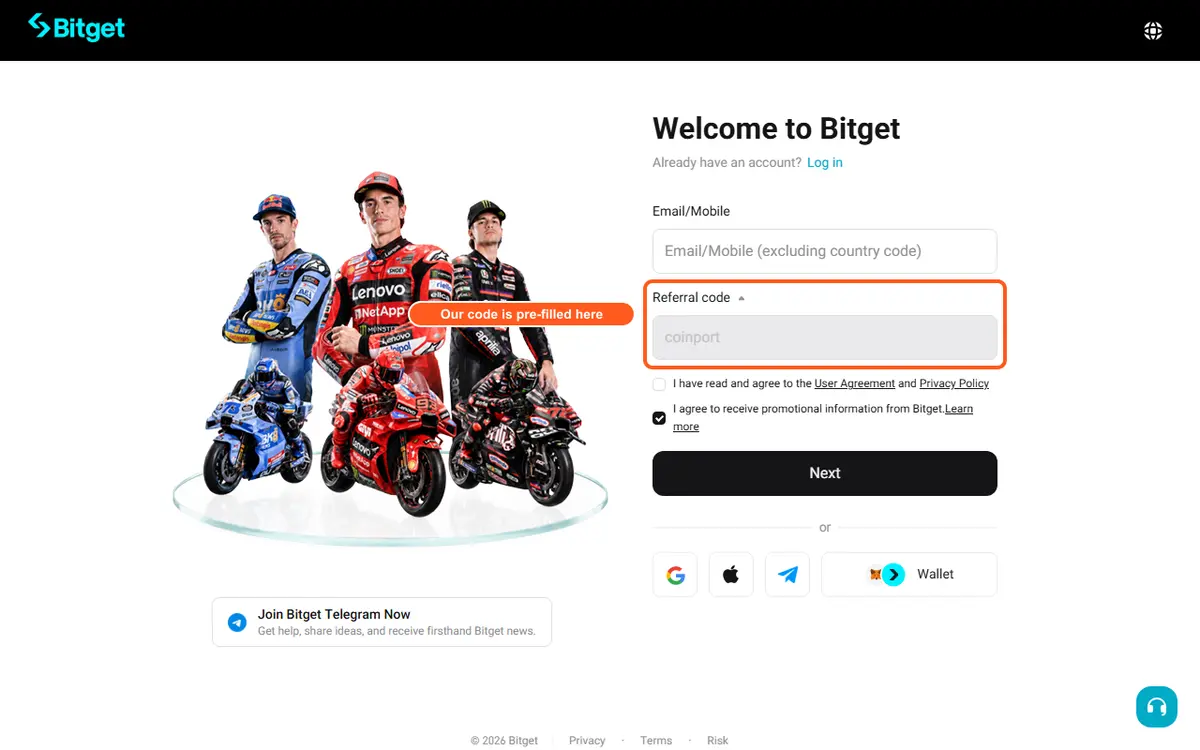
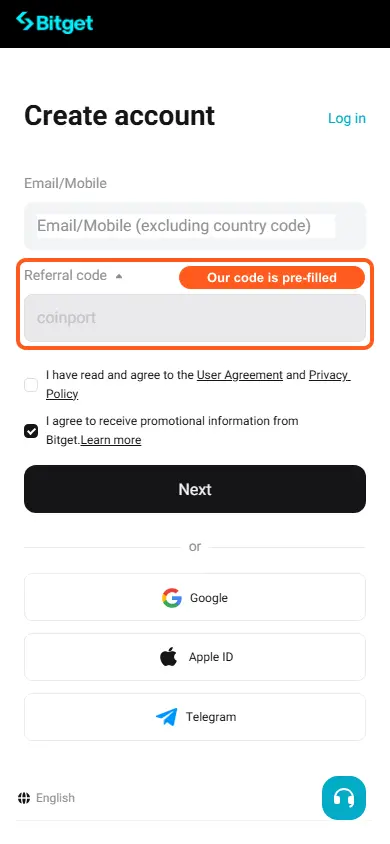
(source: Bitget sign-up page; Bitget Help Center: how to register (website guide), read 29 September 2026)
2. Enter your contact details
Type an email address or a mobile number. Bitget's FAQ says you choose one at sign-up and can link the other later for extra security. Tick the box for the User Agreement and Privacy Policy, then press Next.
3. Set a password and solve the puzzle
The password must be 8 to 32 characters long and contain at least one number, one uppercase letter and one special character from the list Bitget shows. Press Next and complete the captcha puzzle.
4. Enter the 6-digit code
Bitget sends a 6-digit code to the email address or phone you gave. Enter it and press Sign Up.
5. Turn on two-factor authentication
Bitget recommends logging in, opening Security from your avatar in the top-right corner and enabling two-factor authentication (2FA) before you do anything else.
(source: Bitget Help Center: how to register (website guide), read 29 September 2026)
App or website?
Bitget publishes one guide for each. In the app you tap Get Started and then Sign Up, fill in the contact details, password and optional referral code on a single screen, tap Create account, then enter the 6-digit code and tap Submit. The app guide lists email and mobile only, while the website guide adds Google, Telegram and wallet sign-up. The password rules and the 6-digit code are the same in both.
(source: Bitget Help Center: how to register (mobile app guide); Bitget Help Center: how to register (website guide), read 29 September 2026)
Confirm your pre-filled referral code
Through our link the Referral code box should already hold coinport and be greyed out, so it cannot be overtyped by accident. If the box is empty or editable, close the tab and open our link again before entering anything else.
Add the code when you sign up: it is already filled in when you use our link. Bitget's sign-up guides describe the Referral code field as part of the sign-up form (labelled optional) and do not describe adding a code afterwards, so use our link when you sign up.
Claim the Bitget rewards + 20% off fees → 20% lower trading fees through this link
Bitget identity verification (KYC)
Bitget calls it Individual Verification. Its FAQ says that, starting 1 January 2024, identity verification is required to use core services such as crypto deposits and trading, and lists what verifying enables: crypto and fiat deposits, P2P trading and on-chain withdrawals.
(source: Bitget Help Center: common questions about individual verification, read 29 September 2026)
The steps
- Click your profile icon (top right), choose Identity Verification, then press Verify under Individual Verification.
- Pick your Country/Region of Residence, the Issuing Country/Region of your document and the ID type. Bitget notes that accepted ID types depend on your country.
- Enter your full name exactly as it appears on the document. A middle name goes after the first name, so “John Michael Doe” is first name “John Michael” and last name “Doe”.
- Scan the QR code with your phone to photograph the document, then do the face check. Bitget's tips are a plain white background, good light, no hat or glasses, your face centred, and following prompts such as turning your head or blinking.
- The status changes to Under Review, and Bitget emails you when it is approved or needs more information.
(source: Bitget Help Center: how to complete KYC (website guide), read 29 September 2026)
How long it takes, and what happens if it fails
Bitget gives two figures. The FAQ says reviews typically take up to 60 minutes; the step-by-step guide says processing typically takes 1 business day. Past that, Bitget asks you to submit a ticket with your User ID (UID). You get up to 5 attempts within 24 hours, and after that you wait another 24 hours. A rejection arrives with its reason by email or as a notification in your account: fix what it names, such as a blurry or cropped photo, and resubmit.
Each person can verify one Bitget account. Verification is done on the main account only, and sub-accounts inherit its access.
(source: Bitget Help Center: common questions about individual verification; Bitget Help Center: how to complete KYC (website guide), read 29 September 2026)
Withdrawal limits
| Account state | 24-hour withdrawal limit (USDT) |
|---|---|
| Identity verification not completed | 20,000 |
| Verified, VIP 0 | 3,000,000 |
| Verified, VIP 7 | 20,000,000 |
(source: Bitget fee page; Bitget Help Center: common questions about individual verification, read 29 September 2026)
The 20,000 USDT figure is Bitget's wording for VIP users who have not completed identity verification, taken from its fee page; the higher limits step up with VIP level, and VIP 0 and VIP 7 are the two ends of that ladder.
Bitget availability by country
Bitget's Terms of Use (last updated 15 September 2026) define Prohibited Countries as the places below plus any other location Bitget designates from time to time: Austria, Canada, Crimea, Cuba, Donetsk, France, Germany, Hong Kong, Iran, Japan, Kazakhstan, Luhansk, Malaysia, North Korea, Singapore, Sudan, the United States (including Puerto Rico, Guam, the U.S. Virgin Islands, American Samoa, the Northern Mariana Islands and the U.S. Minor Outlying Islands the Terms name), Iraq, Libya, Yemen, Afghanistan, the Central African Republic, the Democratic Republic of the Congo, Guinea-Bissau, Haiti, Lebanon, Somalia, South Sudan and Thailand.
The same Terms require individuals to be at least 18. The list is Bitget's and can change; the linked page always has the current version.
(source: Bitget Terms of Use, read 29 September 2026)
Funding a Bitget account
Crypto deposits, fiat deposits and P2P trading all sit behind verification. For card purchases Bitget's guide adds its own conditions: the account must be fully verified, the card must support international and crypto-related payments and be issued in your name, and first-time users fill in an “Additional verification” form covering account purpose, expected monthly spend, source of funds and job category. It lists Visa, Mastercard, Google Pay and Apple Pay, and ends with 3D Secure authentication through your bank.
(source: Bitget Help Center: buy crypto with a card (website guide); Bitget Help Center: common questions about individual verification, read 29 September 2026)
How to claim the Bitget sign-up rewards
Bitget's sign-up page and its welcome-pack page both headline a 6,200 USDT package. Bitget's Rewards Center article (page dated 23 January 2025) splits it into a 200 USDT welcome bonus, which it says the new user receives by inviting one friend, and up to 6,000 USDT of challenge rewards for depositing and trading within 7 days of registering. After the promotion ends there is a 3-day monitoring period, then two days to claim manually in the Rewards Center or the rewards expire. Sub-accounts, institutional accounts and API traders are not eligible.
Bitget's Rewards Center shows the deposit and trading threshold behind each reward as soon as your account exists; the rewards are tied to those tasks, not paid for signing up alone.
(source: Bitget sign-up page; Bitget welcome-pack page; Bitget Help Center: Rewards Center, read 29 September 2026)
Your trading fees once the account is open
| Maker | Taker | |
|---|---|---|
| Spot | 0.1% | 0.1% |
| Futures | 0.02% | 0.06% |
(source: Bitget fee page, base (non-VIP) tier rates as recorded on 9 September 2026)
Bitget's fee page, read again on 29 September 2026, still shows these regular-tier rates. It also lists a 20% discount on spot fees when they are paid in BGB, VIP levels up to VIP 7 and the 24-hour withdrawal limits used above. Our Bitget page sets out the spot and futures rates for every VIP level.
(source: Bitget fee page, read 29 September 2026)
Quick fixes if sign-up gets stuck
| If this happens | What Bitget says to do | Source |
|---|---|---|
| Where is the 6-digit code? | Check the spam or junk folder and confirm the email address or phone number was typed correctly, then retry. If it still fails, submit a ticket (Bitget FAQ). | Register (web) |
| You want both email and phone on the account | Choose one at sign-up and link the other later for security (Bitget FAQ). | Register (web), Register (app) |
| Verification takes more than an hour | The FAQ says up to 60 minutes and asks for a ticket with your UID after that; the step-by-step guide says typically 1 business day. | KYC FAQ, KYC guide |
| Verification needs another try | Bitget sends the reason by email or notification. Correct it, for example with clearer or uncropped photos or a valid document, and resubmit. You have 5 attempts per 24 hours. | KYC FAQ, KYC guide |
| The ID shows as already used | Each person can verify only one Bitget account, and submitting the same ID for several accounts leads to rejection. | KYC FAQ |
| Deposits and trading are not open yet | Until verification is complete Bitget does not open deposits and trading. | KYC FAQ |
| A card purchase does not go through | Bitget lists wrong card details, insufficient funds, a card that blocks international or crypto payments, unusual-activity flags, a new device or location, and banks that treat crypto as high risk. | Card guide |
Bitget sign-up questions
Do I need KYC to use Bitget?
Yes, to deposit or trade. Bitget says identity verification has been required for core services such as crypto deposits and trading since 1 January 2024. You can register with only an email address or mobile number and no documents; verification is what opens deposits and trading.
How long does Bitget KYC take?
Bitget gives two figures: reviews typically take up to 60 minutes (its FAQ), and processing typically takes 1 business day (its step-by-step guide). After that, submit a ticket with your UID. You get up to 5 attempts in 24 hours.
Can I sign up for Bitget with just an email address?
Yes. Choose email or mobile at sign-up, not both, and link the other later. On the website you can also use Google, Telegram or a wallet. Bitget says no documents are needed to register.
Is there a Bitget sign-up bonus, and what do I have to do to get it?
Bitget headlines a 6,200 USDT welcome package. Its Rewards Center article splits it into a 200 USDT welcome bonus, which it says comes from inviting one friend, and up to 6,000 USDT of challenge rewards for deposits and trading within 7 days of registering. The Rewards Center shows the deposit and trading threshold behind each reward once your account exists.
When do I add the Bitget referral code?
Add the code when you sign up: it goes in the box labelled Referral code on the sign-up form, and through our link it is already filled in as coinport and greyed out. Bitget's sign-up guides describe the code as part of the sign-up form and do not describe adding it afterwards, so use our link when you sign up.
Should I sign up in the Bitget app or on the website?
The steps are the same. In the app you tap Get Started, then Sign Up, and set the password on the same screen as your contact details. On the website the password comes after you press Next and is followed by a captcha puzzle. The website guide also lists Google, Telegram and wallet sign-up.
Is Bitget available in my country?
Bitget publishes a list of Prohibited Countries in its Terms of Use, last updated 15 September 2026, and says it may add other locations. It includes the United States, Canada, Singapore, Hong Kong, Japan, Malaysia, Thailand, Germany and France, among others. Read the full list above, or on the Terms page, before you register.
Sources
Each page below was read in a browser on 29 September 2026. We also opened our own link to look at the sign-up form and the offer headline, and typed nothing into it. The bracketed dates are the ones the pages carry themselves: Bitget's sign-up and KYC help articles date from 2024, which is why we compared them with the live form.
- Bitget sign-up page (live page)
- Bitget Help Center: how to register (website guide) (page dated 16 April 2024)
- Bitget Help Center: how to register (mobile app guide) (page dated 16 April 2024)
- Bitget Help Center: common questions about individual verification (page dated 26 April 2024)
- Bitget Help Center: how to complete KYC (website guide) (page dated 29 April 2024)
- Bitget fee page (live page)
- Bitget Terms of Use (last updated 15 September 2026)
- Bitget Help Center: buy crypto with a card (website guide) (page dated 22 April 2024)
- Bitget Help Center: Rewards Center (page dated 23 January 2025)
- Bitget welcome-pack page (live page)